Scheduling and job sites, without the spreadsheets.
Easier Done brings crew scheduling, job sites, certifications, time off, and payroll into one place — so you always know who's working where, and who's qualified to be there.
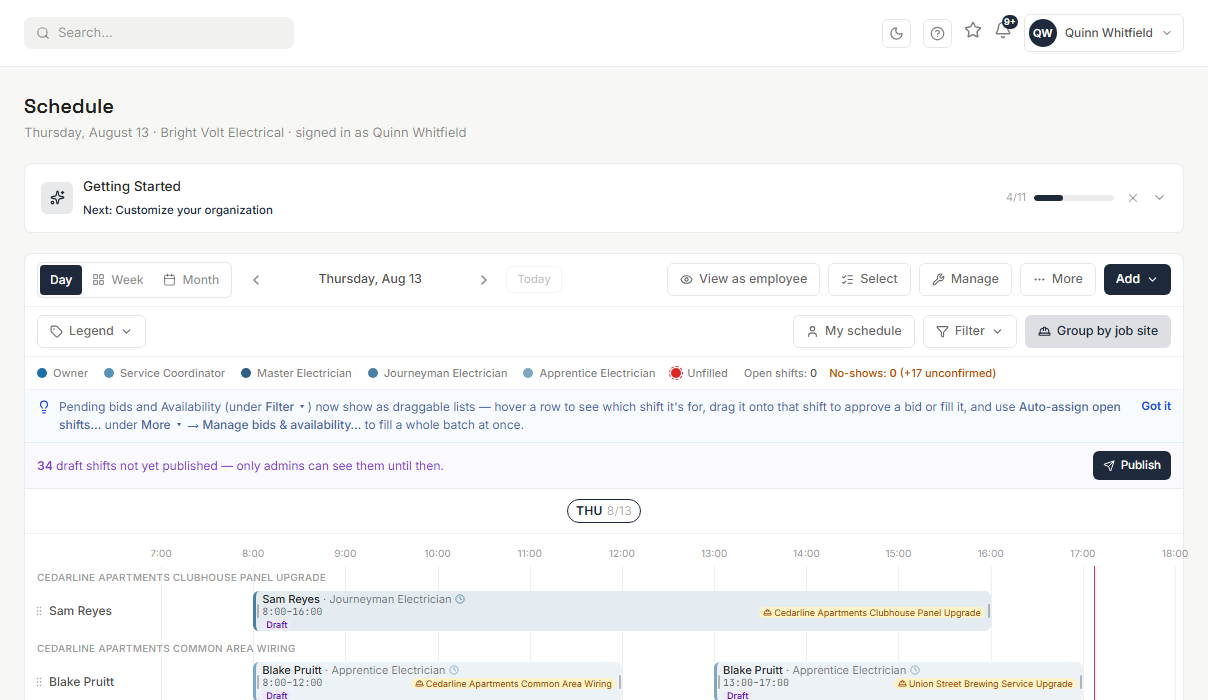
Everything a crew needs. Nothing it doesn't.
One place for the schedule, the job, and the people doing the work — instead of a schedule in one tool and the job details in another.
Smart scheduling
Week, day, and month views with drag-and-drop, shift bidding, and availability-aware assignment — plus conflict and overtime warnings before they become problems.
Job site management
Track services, crew, budgets, materials, and visits for every job site in one place, with each site's own work hours, location, and property boundary.
Auto-scheduler
Propose a qualified, conflict-free crew for every open job site slot automatically — respecting each site's own hours, so one person can legitimately cover two sites in a day.
Certifications & compliance
Track licenses and certifications with expiration dates, and keep anyone who isn't qualified off the jobs that require them.
Time off & availability
Employees request time off and set their availability; managers approve and the schedule respects it automatically.
Payroll & time cards
Approved shifts turn into accurate hours and payroll-ready time cards, without re-keying anything by hand.
Team messaging
Keep crew communication attached to the schedule and the job, not scattered across text threads.
Reporting & dashboards
See staffing gaps, labor costs, and job site status at a glance, not by exporting a spreadsheet.
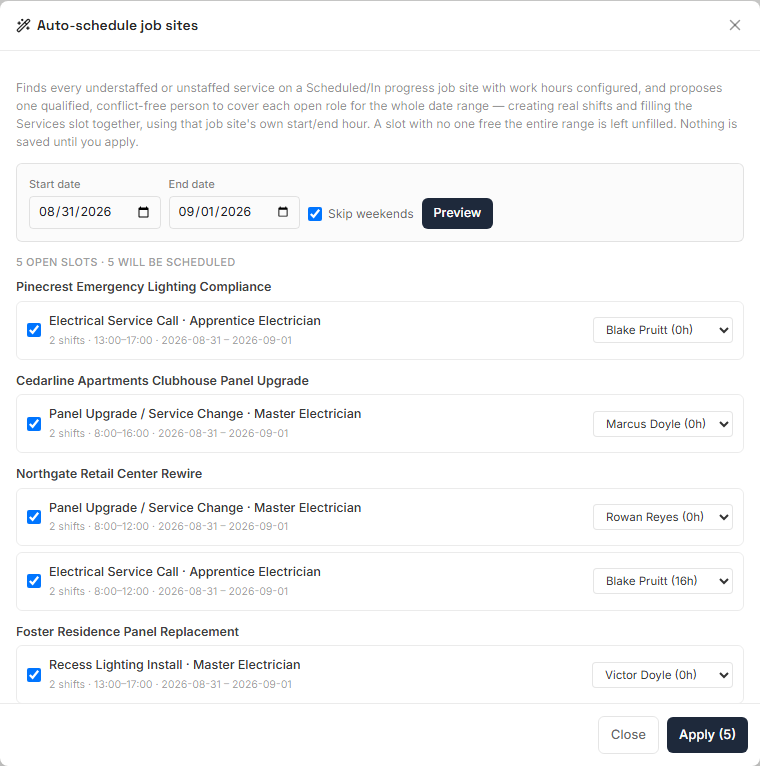
Let the schedule fill itself in — you just approve it
Point the auto-scheduler at a date range and it proposes a qualified, conflict-free person for every understaffed or unstaffed job site slot, using each site's own work hours.
- Give every job site its own hours
- Set a start and end time per job site, down to the quarter hour. The schedule already knows when each site actually needs coverage.
- One person, two sites, the same day
- Because hours live on the job site instead of one blanket setting, the same qualified person can be proposed for two different sites in a day — as long as the hours don't overlap.
- Only qualified, conflict-free people get proposed
- Role match, certification compliance, time-off, and existing shifts are all checked automatically before anyone is proposed for a slot.
- Nothing is scheduled until you approve it
- Review every proposal, swap in a different person, or leave a slot unfilled — then apply it in one step.
Nobody unqualified ends up on the job
Licenses and certifications live on the person, with a real expiration date — so the schedule already knows who's qualified for what before a shift is ever assigned.
- Every license and certification tracked with its own expiration date — not a spreadsheet, not a sticky note
- Anyone who isn't qualified is automatically kept off the jobs that require it
- Expiring soon shows up before it becomes expired, with time to actually renew it
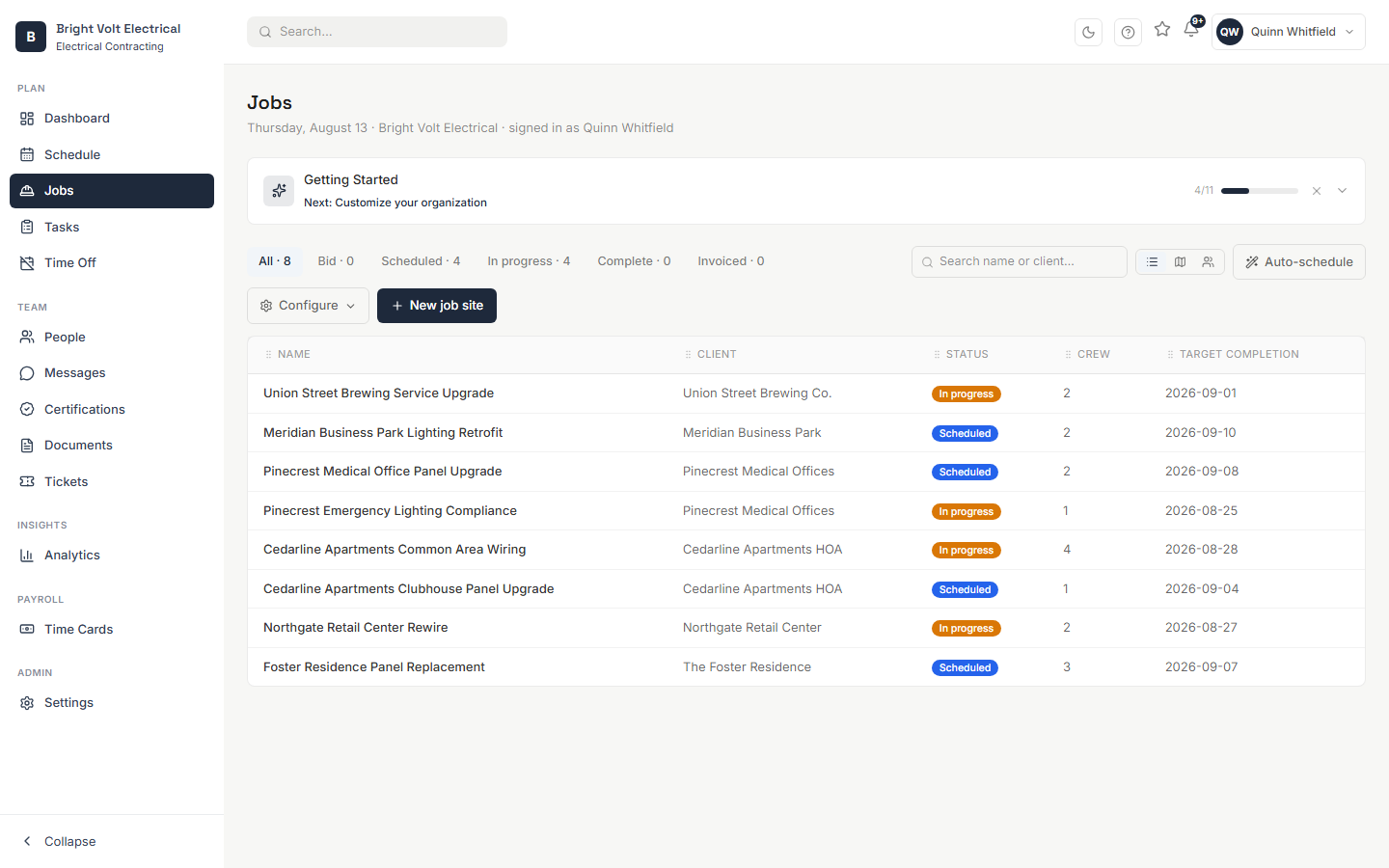
Every job, one place — not a folder of spreadsheets
Each job site tracks what it needs, who's on it, and how it's trending — so a manager can scan the list and immediately see what needs attention.
- Track services, crew, budgets, materials, and visits for every job site in one place
- See staffing status at a glance — staffed, understaffed, or unstaffed — per service
- Give each site its own address, location pin, and property boundary
Punch to paycheck, without re-keying anything
Approved shifts turn into accurate hours automatically — the same schedule that assigned the work produces the time card that pays for it.
- Clock in and out from the field — a standard button, a shared PIN kiosk, or a QR code posted at the job site
- Regular, overtime, and double-time hours split automatically from real punches, not estimates
- A punch outside your grace window gets flagged for review instead of buried in a spreadsheet
Simple pricing, built to scale with your crew
Pay for the employees you schedule — no seat caps, no surprise tiers.
Starter
For a single crew getting off spreadsheets.
- Scheduling (week/day/month)
- Time off & availability
- People directory & onboarding
- Document storage
Growth
For teams managing multiple job sites.
- Everything in Starter
- Job site management
- Certifications & compliance
- Tickets & corrective actions
- Team messaging
Enterprise
For larger or multi-location operations.
- Everything in Growth
- Payroll & time cards
- Analytics & reporting
- Custom roles & permissions
- Dedicated support
Certification tracking on its own, no scheduling required
- Certification & license tracking
- Expiration alerts before they lapse
- People directory & document storage
Upgrade to Starter or Growth any time once you're ready for scheduling.
Run the crew with one system.
Set up your first job site and see the schedule fill itself in.